How Microsoft Entra models an AI agent
In Entra an agent is an agent identity under a blueprint, with a required sponsor and an optional user account. What the objects are, how they relate, and what I think of the model after building against it in a test tenant.
On this page8 sections
Microsoft Entra has its own object types for AI agents, under the name Microsoft Entra Agent ID. An agent is an agent identity, created from an agent identity blueprint, with at least one sponsor who answers for it. An agent can also have a user account, which is a separate, optional object linked to its agent identity. Agent ID has been generally available since April 2026, and Microsoft advises against creating agents as plain app registrations or service principals.
I work in identity governance and build Straza, an open-source project that controls which tools an AI agent may call. This post is based on my testing in a free Entra tenant in November 2026, and on Microsoft’s documentation as of 18 November 2026, which changes often.
The objects
Entra keeps up to four objects for one agent.
- The agent identity blueprint is the template. It holds the authentication settings and the credential.
- The agent identity blueprint principal is the blueprint’s service principal in a tenant.
- The agent identity is what the agent authenticates as, and access is granted to it.
- The agent’s user account is an optional user object that belongs to one agent identity.
Microsoft’s pages use more than one name for the last object. Most say “agent’s user account”, some say “agent user”, and Microsoft Graph has the type agentUser. I say agent user from here on.
The blueprint holds the credential
An agent identity has no credential of its own. Microsoft puts the credential on the blueprint, and one blueprint can have many agent identities.
Getting a token takes two requests. In the first, the blueprint signs in with its credential and names one agent identity in a parameter called fmi_path. Entra answers with an exchange token. In the second, the agent identity presents that exchange token and receives its own access token for the resource.
I sent both requests from a script in the test tenant on 7 November 2026, with a certificate on the blueprint. The access token named the agent identity in appid, sub and oid, with idtyp set to app. Neither request used a credential of the agent identity.
The first request does not check the agent identity. Entra gave me an exchange token for the ID of an agent identity that did not exist, and only the second request failed, with AADSTS700016. Microsoft states what the shared credential means: “A compromise of the blueprint’s credentials affects all agent identities under it.” It advises a managed identity or a certificate in production and says client secrets should not be used there. It also advises against sharing one credential between unrelated blueprints, and its planning page sets one blueprint per trust boundary as the default.
The number of agent identities under one blueprint is capped. A blueprint managed by a platform outside Microsoft can have at most 250 agent identities in a tenant, and the FAQ says the cap applies to app-only calls. Delegated calls, made for a signed-in person, and Microsoft’s own platforms such as Foundry and Copilot Studio are exempt. A user without an admin role can create at most 250 per blueprint either way. Soft-deleted agent identities count toward the limit, so you have to delete them permanently to make room. For a larger fleet, Microsoft says to create more blueprints. Above all of this, agent identities may take up at most 80% of the tenant’s directory object quota, which is 50,000 objects for a tenant without a verified domain and 300,000 with one.
Disabling a blueprint stops every agent identity under it from authenticating. The Microsoft Graph beta reference adds that existing tokens remain valid until they expire.
Deleting a blueprint is less clear, because Microsoft’s pages disagree. The page on creating a blueprint and the FAQ say that deleting a blueprint also removes its agent identities and their agent users. The page on deletion says the API references do not specify that, and tells you not to rely on a cascade. Nothing I recorded in the test tenant settles it.
When the blueprint acts, its token carries the blueprint principal’s object ID in oid, and the audit log records the actions under that principal. Creating a blueprint through Microsoft Graph does not create the principal. The wizard in the admin center, which is marked as preview, created both for me.
Microsoft’s pages describe two instance modes for a blueprint and mark them as preview. Everything above is the multi-instance mode, which is the one I used. A single-instance blueprint has exactly one agent identity. The blueprint and its agent identity share a client ID. There is no blueprint principal, and the agent identity asks for its token directly. The mode is set when the blueprint is created and cannot be changed.
The agent identity holds the access
An agent identity is a service principal with an agent subtype. In Microsoft Graph the type agentIdentity inherits from servicePrincipal. It gets access through Microsoft Graph permissions, Azure roles, Entra roles, app roles, group memberships and access packages. Highly privileged directory roles such as Global Administrator cannot be assigned to an agent identity. An agent identity also cannot be a member of a role-assignable group, which is Entra’s name for a group that can itself be assigned an Entra role. It can be a member of an ordinary security group. A set of high-risk Microsoft Graph permissions is blocked for agents as well, among them Application.ReadWrite.All and User.ReadWrite.All.
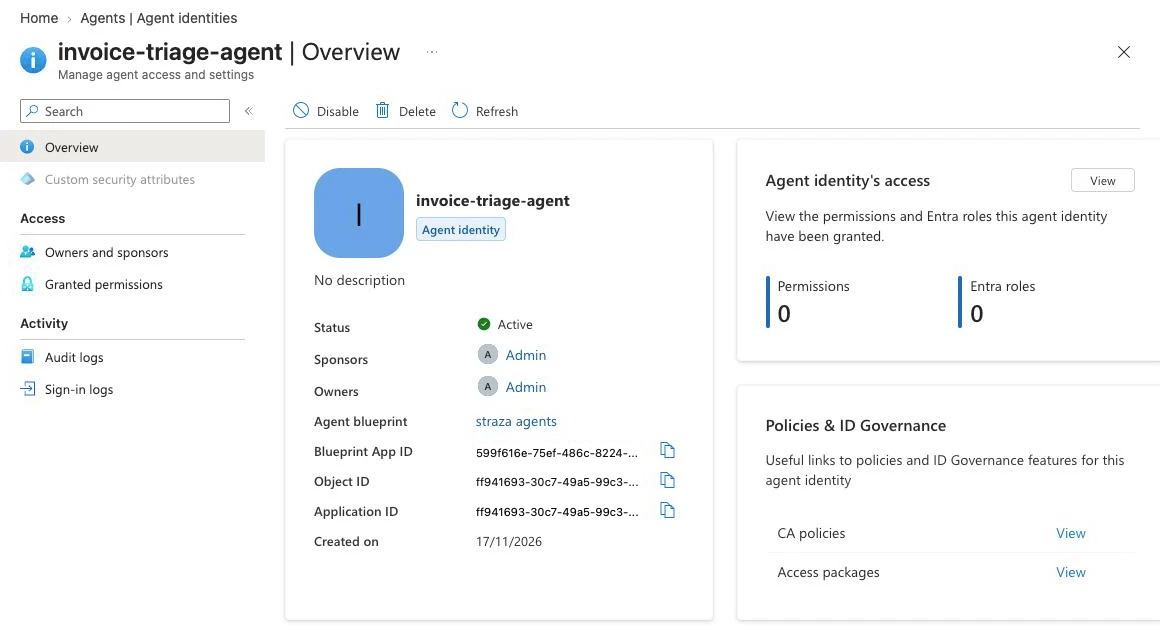
The agent identity’s page in the Entra admin center has a Disable button. I pressed it on 7 November 2026, and within a minute the next token request for that agent identity failed with AADSTS7000112. The access token issued before that was valid for an hour. I did not test whether a resource still accepted it after the disable. When I timed changes on 17 November 2026, a rename, a disable or a new sponsor on an agent identity showed in Microsoft Graph reads 5 to 21 seconds later.
The agent user is optional
An agent user belongs to exactly one agent identity, an agent identity can have at most one, and the link cannot be changed afterwards. The agent user exists for what only works with a user, such as a mailbox, chat or an API that accepts user tokens only. Its tokens carry idtyp=user.
An agent user has no password and no passkey, and it authenticates only through its agent identity. It cannot hold privileged administrator roles and cannot join a role-assignable group. It can join other groups, dynamic ones included, and it can hold licenses.
Microsoft says to create one only when the agent needs it, because agent users “add complexity with licenses, group memberships, and user-level policies”. Entra does not create one automatically.
In the test tenant I created agent users with one Microsoft Graph request: POST /beta/users with the type microsoft.graph.agentUser and the agent identity’s ID in identityParentId. It worked on the free plan. One of those requests went out seconds after its agent identity was created. It answered Request_ResourceNotFound but had created the user anyway, so the retry failed with a conflict. After that error, read the user before you send the create again.
An agent user made this way gets no Microsoft 365 capabilities. For a mailbox and the rest of Microsoft 365, Microsoft says to create the agent through Microsoft Teams with Microsoft Agent 365. The Agent 365 pages add that agents with an agent user are available only to tenants in the Frontier preview program.
Sponsors, owners and managers
A sponsor is accountable for an agent’s purpose and for the decisions about its lifecycle. A blueprint is a directory object of its own, so it has sponsors of its own. The Microsoft Graph reference describes them as the users or groups “who can authorize and manage the lifecycle of agent identity instances”. A blueprint and an agent identity each need at least one sponsor when they are created. When I created a blueprint in the admin center, the wizard had me, the creator, preset as its owner and sponsor. A sponsor can disable the agent identity, soft-delete it and change its sponsors, but cannot enable or restore it and has no other administrative access to it.
An owner is the technical administrator. Owners manage the credentials and the configuration, and they can enable or restore what a sponsor disabled or soft-deleted. An owner is a user or a service principal, and owners are optional. A manager is set on the agent user and can request access packages for it.
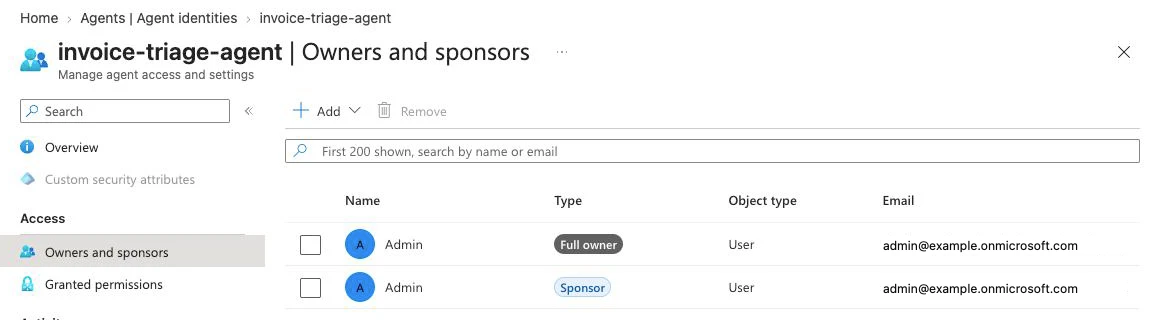
An agent identity can have up to 100 sponsors, and up to five of them can be groups. When a group is a sponsor, every member has sponsor rights. Only some groups qualify: groups with dynamic membership, and Microsoft 365 groups with assigned membership. A security group with assigned membership does not, and neither does a role-assignable group.
I tested this in the test tenant on 17 November 2026. Entra refused a security group as a sponsor with a 400 and the text “Only dynamic and M365 groups are allowed”. It accepted a second person as sponsor. It also accepted the removal of the last sponsor, and the agent identity then listed none. Microsoft requires a sponsor at creation, and in the test tenant nothing kept the last one in place.
The agent user has a sponsor list of its own. It is not required, it holds at most five entries, and its sponsors have no authorization to modify the agent user. Microsoft recommends treating the agent identity’s sponsor as the primary one.
When a sponsor leaves, the sponsorship can move to that person’s manager. One Agent ID page says Entra does this automatically. The governance overview says it “can be automatically transferred” and points to Lifecycle Workflows, which has a task named Transfer agent identity sponsorships to manager for a mover or leaver workflow. The task needs the manager attribute of the leaving user to be filled in. It belongs to the governance features that need a license.
Groups, Conditional Access and licenses
An agent identity and an agent user can each be a member of a security group. In the test tenant I added both through Microsoft Graph. The Add members dialog of the admin center has one tab named Agent identities and one named Agents’ user accounts.
Conditional Access for agents is evaluated when Entra issues or refreshes an access token. The resource then validates the token and makes its own authorization decision from the claims. A policy that targets an agent identity does not apply to its agent user, and a policy that targets all users does not include agent users. Policies that target agent users are marked as preview. For an agent identity the only control a policy can apply is Block access. Microsoft writes: “Conditional Access only protects resources secured by Microsoft Entra ID.” An agent that calls a tool with an API key never asks Entra for a token, so no policy applies to that call.
Agent ID is available to every Entra customer. The test tenant is on the free plan, and I could create blueprints, agent identities and agent users in it. Conditional Access for agents and identity governance for agents each need one of two things: Microsoft 365 E7, or an Agent 365 license plus at least Microsoft Entra ID P1 or Microsoft 365 E3. Agent 365 is licensed per user.
Another Agent ID page names Microsoft Entra ID P1 alone for Conditional Access. For ID Protection for agents, one page says Agent 365 will be required “starting soon” and another says Microsoft Entra ID P2 during preview. Ask Microsoft before you budget for any of these.
What I ran into when another system reads Entra’s agents
SCIM provisioning carries the agent user only
Entra’s SCIM provisioning to an enterprise application supports users and groups only. Microsoft adds that agent users can be provisioned over SCIM and agent identities cannot. In the test tenant, the enterprise application did not offer an agent identity under Users and groups.
An agent user arrived at the SCIM target as an ordinary user. The record did not say that it was an agent or name its agent identity until I added two mapping rows myself, one of them from identityParentId. The sponsor did not arrive at all. The list of source attributes for the mapping had no sponsor in it.
So an agent set up as Microsoft advises, without an agent user, cannot be pushed to another system over SCIM. The other system has to learn about it another way, such as reading Microsoft Graph.
A v1.0 member read leaves the agent identity out
On Microsoft Graph v1.0, GET /groups/{id}/members returned the users, the agent users and the nested groups of a group. It did not return the agent identity that was also a member. The cast members/ returned it, typed as agentIdentity. The beta members returned everything in one read. Microsoft’s reference page lists this as a known issue for service principals and suggests the beta endpoint or $expand=members. In the test tenant, $expand=members answered 403 for the application I read the group with.
An agent identity in a nested group was returned by no v1.0 read of the outer group, transitiveMembers included. On v1.0, only the cast on the nested group itself returned it, and the beta transitiveMembers returned it too. The delta query groups/delta reported an agent user as user and an agent identity as servicePrincipal, so the delta alone does not tell an agent from a person or an application.
Check your own export and reporting scripts that list a group’s members on v1.0 against a group that holds an agent identity.
My thoughts
I would register agents this way in any tenant that already runs on Entra. A plain service principal has no enforced sponsor and no lifecycle that a blueprint manages.
The owners and sponsors seem confusing and illogical to me. A blueprint can have several owners and several sponsors, and every agent identity under it can have several of each again. In the test tenant the blueprint’s sponsor was one person and an agent identity under it had another.
I would name one person for each agent identity. A list of 100 sponsors does not tell me who is accountable, and neither does a group whose members change by a rule. I would also check that the person is still there, because Entra let me remove the last sponsor.
The agent user is where the model costs the most. An agent with an agent user has two sponsor lists and needs two sets of Conditional Access policies. Its agent user can go to another system over SCIM, and its agent identity cannot. I would follow Microsoft’s advice and leave the agent user out until something needs a user.
Entra decides whether an agent gets a token, and the resource makes the authorization decision. The decision about a single call therefore belongs to the resource, or to a component in front of it.